

Priya was a second-year commerce student in Pune with no design degree, no Photoshop skills, and exactly ₹0 to invest.
Six months later, she was earning ₹22,000/month — from her hostel room — designing Instagram templates for small businesses on Canva.
I’m not telling you this to hype you up. I’m telling you because her story is replicable. Not easy, not overnight, but genuinely replicable.
Canva has quietly become one of the most powerful income tools available to students and freshers in India right now. Not because it’s magic, but because it gives ordinary people the ability to produce professional-looking designs quickly — and businesses will pay for those designs every single day.
In this guide, I’ll walk you through 7 proven ways to make money from Canva in 2026. I’ll cover exactly how each method works, what you need, how much you can realistically earn, where to find clients or buyers, and what makes the difference between people who actually earn versus those who just read about it and do nothing.
Let’s start.
Can You Really Make Money from Canva in 2026?
Yes — but let me be specific about what that actually means, because vague “yes you can” answers waste your time.
Canva itself doesn’t pay you. It’s a design tool, not an employer. What it does is make design work accessible enough that almost anyone — regardless of experience — can offer design-based services or products to paying clients and customers.
Here’s why this matters in 2026 specifically:
Demand has exploded. Every business — from a local chai shop to a funded startup — needs social media posts, presentations, and marketing materials. Most don’t have a dedicated designer on staff.
The barrier to entry dropped. Before Canva, you needed Adobe skills that took years to learn. Canva’s drag-and-drop interface means you can produce client-ready work within hours of your first login.
Indian SMEs are digitizing fast. According to NASSCOM, India had over 50 million small businesses in 2025, and an increasing share are actively investing in digital presence. That’s a massive buyer pool for design services.
The opportunity is real. But — and this is important — it requires consistent effort. The people who make good money from Canva are not lucky. They picked one method, got good at it, found clients, and kept going.
Table of Contents
What You Need Before You Start Making Money from Canva
Keep this section short, because the answer actually is short:
✅ A free Canva account — the free version is enough to start every method in this guide
✅ A laptop or smartphone with a decent internet connection
✅ A free account on at least one client-finding platform (Fiverr, Internshala, or LinkedIn)
✅ 2–3 hours per day of focused, distraction-free work time
✅ Patience for the first 3–4 weeks while you build samples and find your first clients
What you do NOT need:
- A design degree or any prior design experience
- Canva Pro (useful later, not required to start)
- Money to invest upfront
- Permission from anyone
Total starting cost: ₹0.
Way 1 — Sell Canva Templates: The Best Passive Income Way to Make Money from Canva
Monthly Earning Potential: ₹5,000–₹40,000 Income Type: Passive (make once, sell repeatedly) Difficulty: ⭐⭐⭐☆☆ Time to First Income: 2–4 weeks
Selling Canva templates is the most-talked-about way to make money from Canva — and with good reason. You design a template once, list it on a marketplace, and it keeps generating income for months or years without any additional work.
But here’s where most beginners go wrong: they create templates in random categories and wonder why nothing sells. The key is niche specificity.
A template called “Instagram Post Template” will barely sell. A template called “30-Day Social Media Content Pack for Indian Fitness Coaches” will.
What templates sell consistently in India:
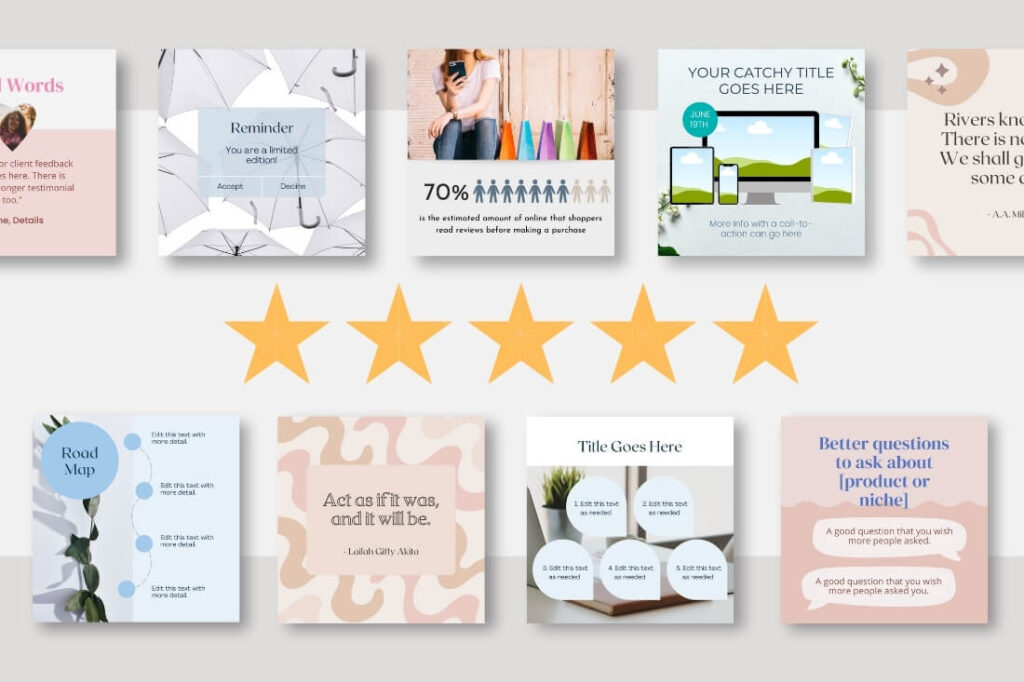
- Instagram carousel templates for coaches, consultants, and educators
- Resume and CV templates targeting freshers and college graduates
- Business presentation decks for startups and small businesses
- Wedding invitation kits — huge demand in India; priced at ₹499–₹1,499
- YouTube channel art sets (banner, thumbnail template, endscreen)
- Study planner and timetable templates for students
- Digital visiting cards for freelancers and entrepreneurs
Where to sell your Canva templates:
- Etsy — Largest global marketplace for digital downloads; Indian sellers can receive payment in INR. This is where most serious template sellers start.
- Instamojo — Best Indian platform; instant UPI payouts; zero upfront cost
- Gumroad — International reach; simple setup; works well for bundles
- Your own Instagram page — Post a sample of your template; sell via UPI link in bio
The workflow:
- Pick one specific niche (e.g., “Indian coaching centers”)
- Research what they post on Instagram — what formats do they use?
- Create 10–15 variations of one template type in that niche
- Bundle them (bundles sell 3× better than single templates)
- Write a listing with a clear title, mockup preview images, and editing instructions for the buyer
- Price at ₹199–₹799 per bundle for Indian buyers; $5–$25 for international
One critical rule: If you want to sell templates to Canva Free users, use only Free-plan elements in your design. If your template contains Pro elements, buyers on the free plan can’t download it properly — and you’ll get refund requests and bad reviews.
Realistic income trajectory:
| Month | Templates Listed | Monthly Earning |
|---|---|---|
| Month 1 | 3–5 bundles | ₹0–₹2,000 |
| Month 2–3 | 10–15 bundles | ₹3,000–₹10,000 |
| Month 4–6 | 25+ bundles | ₹10,000–₹30,000 |
| 6+ months | 50+ bundles | ₹25,000–₹60,000+ |
Way 2 — Freelance Graphic Design: Fastest Way to Make Money from Canva
Monthly Earning Potential: ₹10,000–₹60,000 Income Type: Active (paid per project or retainer) Difficulty: ⭐⭐☆☆☆ Time to First Income: 3–7 days
This is the fastest path to your first rupee from Canva. While template selling takes weeks to build momentum, freelance design can land you a paying client this week — especially if you target local businesses in your area.
Freelance design means offering your Canva skills as a service: a client tells you what they need, you design it, they pay you. Simple.
What design services you can offer on Canva:
- Social media graphics — Instagram posts, Stories, Reels covers, LinkedIn banners
- Logo and basic branding kits — logo, business card, letterhead (bundle these)
- Presentation decks — company presentations, pitch decks, investor decks
- Flyers and posters — events, sales, promotions
- Infographics — for blogs, reports, educational content
- Email newsletters — beautifully formatted HTML newsletters for businesses
Where to find your first freelance client:
- Fiverr — Create a gig for “Canva Social Media Posts” or “Canva Instagram Templates Design”; start at ₹500–₹800 per design set
- Internshala — Look for graphic design internship listings; many are remote and paid
- LinkedIn — Search “social media manager needed” or “graphic designer remote”; many small startups post here
- Local approach — Walk into 5 local businesses (salons, restaurants, coaching centres, boutiques) with 3 sample designs you already made for their category. Show, don’t tell.
- Your college network — Student clubs, societies, event committees all need design work. One campus client leads to five referrals.
How to price your freelance Canva work:
| Service | Beginner Rate | Intermediate Rate |
|---|---|---|
| Single Instagram post | ₹200–₹400 | ₹600–₹1,000 |
| 10-post pack | ₹1,500–₹2,500 | ₹4,000–₹7,000 |
| Logo + business card | ₹800–₹1,500 | ₹2,500–₹5,000 |
| Pitch deck (15 slides) | ₹2,000–₹4,000 | ₹6,000–₹15,000 |
| Monthly social retainer | ₹3,000–₹6,000 | ₹8,000–₹20,000 |
Important: Show your portfolio before the client asks. Create 5–8 sample designs in different categories using Canva and upload them to a free Behance or Canva Portfolio page. Clients hire designers who can show their work — not those who describe it.
Way 3 — Social Media Content Packages: Earn Recurring Monthly Income from Canva
Monthly Earning Potential: ₹8,000–₹35,000 Income Type: Recurring (same clients, monthly payment) Difficulty: ⭐⭐☆☆☆ Time to First Income: 1 week
This is my personal favourite method for anyone learning how to make money from Canva — because it creates predictable, recurring income instead of one-off projects you have to constantly refill.
The concept: you manage the visual content for a business’s social media page on a monthly basis. You use Canva to design their posts, stories, and reels covers. They pay you every month. You keep the relationship alive by delivering consistently good work.
A typical ₹4,000/month package includes:
- 12 Instagram posts (3 per week, designed in Canva)
- Post captions (you can use ChatGPT for these)
- 8 Instagram Stories per month
- 1 content theme calendar showing planned post topics
- Delivery via Google Drive or WhatsApp
With 5 such clients, you’re earning ₹20,000/month from recurring work — without hunting for new clients every week.
How to structure and pitch your packages:
| Package | What’s Included | Price/Month |
|---|---|---|
| Starter | 8 posts + 4 stories | ₹2,000 |
| Standard | 12 posts + 8 stories + captions | ₹4,000 |
| Premium | 16 posts + 12 stories + captions + monthly report | ₹7,000 |
The secret to landing your first retainer client:
Don’t pitch your service — give a free sample first.
Pick a business with a weak Instagram page. Spend 30 minutes designing 3 posts for them in Canva using their brand colours and logo. Send it via DM or WhatsApp: “Hi, I designed these 3 posts for your page — completely free. Would you like to see what a full month of content could look like?”
That one message, backed by a quality free sample, converts better than any sales pitch. Three out of five businesses I’ve tried this with said yes.
Way 4 — Sell Digital Products: Make Passive Income from Canva as a Beginner
Monthly Earning Potential: ₹4,000–₹30,000 Income Type: Passive Difficulty: ⭐⭐☆☆☆ Time to First Income: 1–2 weeks
This method goes beyond just selling editable templates. It’s about creating finished, downloadable digital products using Canva that buyers use directly — no editing needed.
Best digital products to create and sell with Canva:
- Printable planners — Daily planner, study schedule, fitness tracker, budget tracker. Indian students and working professionals buy these constantly. Price: ₹99–₹299/piece.
- eBook covers and interior layouts — Authors and course creators on Instagram need beautiful eBook designs. Charge ₹500–₹1,500 per eBook layout.
- Wall art and quote posters — Motivational, aesthetic, and niche-specific. Sell as digital downloads. Buyers print at home.
- Workbooks and guides — Educational PDFs for coaches, teachers, and course creators. High value; charge ₹300–₹800 per workbook.
- Business card bundles — Pre-designed visiting card sets. Entrepreneurs download, edit their details, and print locally.
- Festival and wedding invitations — Indian festivals (Diwali, Navratri, weddings) generate massive demand for ready-made digital invites. Priced at ₹299–₹799/bundle.
Where to sell digital products in India:
- Instamojo — Easiest Indian platform; UPI checkout; instant bank transfers
- Gumroad — Great for international buyers; accepts Indian bank accounts
- Etsy — Best for reaching global buyers; wedding and festival content does especially well internationally
What makes digital products sell vs. gather digital dust:
A product with a bad mockup image and a vague title will not sell, even if the design itself is beautiful. Spend extra time on:
- A clean, professional preview image showing the product in context (use Canva’s own mockup tools)
- A specific, benefit-driven title — not “Planner Template” but “30-Day Student Study Planner — Printable PDF for Exam Season”
- A simple product description explaining what the buyer gets and how to use it
Way 5 — YouTube Thumbnails and Video Graphics: High-Demand Canva Work
Monthly Earning Potential: ₹6,000–₹25,000 Income Type: Active + Recurring Difficulty: ⭐⭐☆☆☆ Time to First Income: 4–7 days
Every YouTuber in India needs thumbnails — and most of them are terrible designers. This is one of the most underused ways to make money from Canva, and the clients are everywhere.
A great thumbnail can increase a YouTube video’s click-through rate by 40–50%. Creators know this. They will pay for good thumbnail design because it directly affects their income.
What you can offer:
- Custom YouTube thumbnails — per thumbnail or monthly package
- YouTube channel art — banner, profile icon, watermark set
- Video intro/outro graphics — designed in Canva and exported as MP4
- Shorts and Reels cover images — used as the preview frame on video content
- Instagram Highlight covers — small but consistent demand; easy to batch-produce
Pricing for thumbnail design:
- Single thumbnail: ₹150–₹350
- Pack of 10 thumbnails: ₹1,200–₹2,500
- Monthly retainer (4 videos/month): ₹1,500–₹4,000/month
Where to find YouTube thumbnail clients:
- Fiverr — “YouTube thumbnail design” is one of the most searched gig categories on the platform. Set up a gig with 3 strong sample thumbnails as portfolio images.
- Direct outreach — Find Indian YouTube channels with 5,000–100,000 subscribers that have visually weak thumbnails. DM them with a redesigned sample of one of their existing thumbnails. This direct approach has a very high response rate.
- Creator communities — Telegram groups for Indian content creators often have people asking for affordable design help.
Pro tip: Study the highest-performing thumbnails in your target niche (tech, cooking, education, finance) and identify the visual patterns they use — bold text, contrasting colours, emotional faces, clear numbers. Replicate these patterns in your samples. Clients want thumbnails that look like they’ll perform, and familiar patterns reassure them.
Way 6 — Resume and LinkedIn Profile Design: Most Overlooked Way to Earn from Canva
Monthly Earning Potential: ₹8,000–₹30,000 Income Type: Active Difficulty: ⭐☆☆☆☆ (easiest on this list) Time to First Income: 2–4 days
Here’s a Canva income method that almost nobody talks about, yet the demand is enormous and the clients are literally right around you.
Every final-year student in India needs a resume. Every fresher who just graduated needs a polished LinkedIn profile. Every professional switching jobs needs an updated CV. And most of them have no idea how to make it look professional.
With Canva, you can produce a clean, ATS-friendly, visually polished resume in 20–30 minutes. Charge ₹300–₹800 per resume. Do 3–5 per day and you’re earning ₹1,000–₹4,000/day without any client acquisition cost beyond word of mouth.
What a full resume design package looks like:
- 1 ATS-friendly resume (1 page; clean layout; proper hierarchy)
- 1 matching cover letter template
- 1 LinkedIn banner image
- Delivered as PDF + editable Canva link
Charge ₹500–₹1,200 for this full package. That’s a fair price for a student or fresher — and a 20-minute job for you once you have a workflow.
Where to find resume clients:
- Your own college — Final-year batches, placement groups, student WhatsApp networks. Post: “I design clean Canva resumes for ₹399 — DM me your details.” You’ll get 5–10 inquiries in the first 48 hours.
- LinkedIn — Post a before/after of a sample resume transformation. The engagement and DMs will follow.
- Fiverr — “Resume design” is a high-demand, evergreen Fiverr category. Indian freshers search for affordable options constantly.
- Internshala — Many freshers on this platform want help presenting themselves better.
This is the single fastest method to earn your first ₹500 using Canva. If you’re reading this and haven’t started yet — this is where to begin.
Way 7 — Canva Affiliate Marketing: Make Passive Income from Canva by Recommending It
Monthly Earning Potential: ₹3,000–₹20,000 Income Type: Passive Difficulty: ⭐⭐☆☆☆ Time to First Income: 3–6 weeks
This is the only method on this list where you don’t actually do any design work. Instead, you earn a commission by recommending Canva Pro to others.
Canva has an official affiliate program. When someone signs up for Canva Pro using your referral link and pays for a subscription, you earn a commission. Canva Pro currently costs around ₹4,000/year in India — and their affiliate program pays competitive commissions per referral.
How to make this work as a beginner:
The key is creating content that targets people who are already searching for Canva — and naturally placing your affiliate link within that content.
Where to publish affiliate content:
- A blog or website — Write posts like “Is Canva Pro Worth It in 2026?” or “Canva Free vs Pro: What You Actually Get.” These are high search-volume queries and convert very well.
- YouTube — A “Canva Tutorial for Beginners” video with your affiliate link in the description. Tutorial videos drive consistent clicks over months.
- Instagram Reels or Shorts — Quick “5 things I use Canva Pro for” content with a link in bio.
- Quora answers — Answer questions about Canva and include your link in the relevant context.
- Telegram channel — Build a “design tips” or “online earning” channel and share your affiliate link with genuine recommendations.
Important rule: Always disclose that you’re using an affiliate link. Not just for ethical reasons — Google’s algorithm and various platform policies increasingly flag content that doesn’t disclose. A simple “This post contains affiliate links” at the top is all it takes.

Which Method Should You Start With?
Here’s an honest decision framework. This is how to pick the right method based on your specific situation:
| Your Situation | Best Starting Method |
|---|---|
| You want income this week | Resume design (Way 6) or Freelance design (Way 2) |
| You have 50+ WhatsApp contacts who run businesses | Social media content packages (Way 3) |
| You want long-term passive income | Canva template selling (Way 1) or digital products (Way 4) |
| You follow YouTube creators in a niche | YouTube thumbnail design (Way 5) |
| You have a blog or social media platform | Affiliate marketing (Way 7) |
| You’re completely new with zero experience | Resume design (Way 6) — lowest barrier, quickest first income |
My personal recommendation for most beginners: Start with Way 6 (resume design) for your first ₹2,000–₹5,000. It’s the fastest, requires the least creative skill, and your target customers are literally in your own college or social circle.
Once you’re comfortable and earning, add Way 2 or Way 3 for higher income. Then build a passive income layer with Way 1 or Way 4 over 2–3 months.
How Much Can You Realistically Earn from Canva in 2026?
Let me be specific — because vague income promises help no one.
| Method | Beginner (Month 1–2) | Consistent (Month 3–5) | Scaled (6+ months) |
|---|---|---|---|
| Template Selling | ₹0–₹2,000 | ₹5,000–₹12,000 | ₹20,000–₹50,000 |
| Freelance Design | ₹2,000–₹8,000 | ₹10,000–₹25,000 | ₹30,000–₹60,000 |
| Social Media Packages | ₹2,000–₹6,000 | ₹10,000–₹20,000 | ₹20,000–₹40,000 |
| Digital Products | ₹0–₹3,000 | ₹4,000–₹12,000 | ₹12,000–₹35,000 |
| Thumbnail Design | ₹1,500–₹5,000 | ₹6,000–₹15,000 | ₹15,000–₹30,000 |
| Resume Design | ₹2,000–₹6,000 | ₹8,000–₹20,000 | ₹20,000–₹40,000 |
| Affiliate Marketing | ₹0–₹1,000 | ₹2,000–₹8,000 | ₹8,000–₹25,000 |
These are conservative, realistic figures. The people you see claiming ₹1 lakh/month from Canva in their first month are either exceptions or exaggerating. The figures above represent what a consistent, focused beginner can genuinely achieve.
The most important variable in the table above is not which method you choose — it’s whether you show up consistently for 90 days.
Common Mistakes Beginners Make When Trying to Make Money from Canva
These are the patterns I’ve seen repeatedly. Avoid them.
Mistake 1: Trying all 7 methods at once. I listed 7 ways because readers want options — not because you should pursue all of them simultaneously. Pick one. Get your first ₹5,000 from it. Then add a second method.
Mistake 2: Designing without a niche. A generic “social media template” competes with millions of other listings. A “template pack for Indian fitness coaches” competes with almost nothing. The narrower your niche, the faster you find buyers.
Mistake 3: Using Pro elements in templates you sell to Free users. This is a technical mistake that causes real problems. If your template includes elements that require Canva Pro, buyers on the free plan can’t fully access them. They’ll leave bad reviews. Always check and label your templates by plan type.
Mistake 4: Showing up without samples. No client wants to be your guinea pig. Before approaching anyone for paid work, create 5–8 strong sample designs in your chosen category. These are your proof of capability — and they do most of the selling for you.
Mistake 5: Quitting in week 2 or 3. The first 2–3 weeks are almost always silent. No sales. No responses. This is normal — it’s not failure, it’s the setup phase. The beginners who push through this quiet period almost always see results in week 4 or 5.
Mistake 6: Underpricing out of fear. Charging ₹100 for a logo design doesn’t just hurt your earnings — it signals low value to clients and makes them question your quality. Charge fairly from the start. ₹500–₹800 for a logo and ₹3,000–₹5,000 for a monthly social package is reasonable and defensible.
FAQs — How to Make Money from Canva
Q: Do I need Canva Pro to make money from Canva? No. Every method in this guide works with a free Canva account. Canva Pro (around ₹4,000/year) adds useful features like background remover, more elements, and Brand Kit — but it’s not required to start. Upgrade once you’re earning enough that the cost is easy to justify.
Q: Is Canva free to use for commercial purposes? Yes. Canva explicitly allows users to use their designs for commercial work. However, there is one important rule: if you’re selling templates, you must create them from scratch using original or properly licensed elements. You cannot take an existing Canva template, make minor edits, and resell it as your own.
Q: Can I make money from Canva without any design experience? Absolutely. Canva is designed for non-designers. The drag-and-drop interface means anyone can produce professional-looking work within a few hours of learning. Resume design (Way 6) and social media packages (Way 3) are the easiest entry points for complete beginners.
Q: How long does it take to earn your first ₹1,000 from Canva? For active methods like resume design or freelancing, most people earn their first ₹1,000 within 3–7 days of starting. For passive methods like template selling, expect 2–4 weeks before your first sale — because your listing needs time to be discovered.
Q: Which platform is best to sell Canva templates in India? Instamojo is the easiest for Indian buyers (UPI checkout, instant payments). Etsy gives you international reach and a large existing buyer base. For starting out, list on both simultaneously — they serve different audiences and the setup is free on both.
Q: Is the Canva affiliate program available in India? Yes. Indian creators can join Canva’s affiliate program and earn commissions in INR. The exact commission structure and sign-up process are available on Canva’s official website. Payments can be received via bank transfer or PayPal.
Q: Can I do Canva freelancing alongside my college studies? Yes — and this is arguably one of the best times to start. Online design work is fully flexible. You work during your free periods, evenings, and weekends. Many students manage 2–3 hours of Canva work per day without affecting their academic performance.
One Final Thought Before You Close This Blog
Most people who read an article like this feel motivated, bookmark it, and open it again six months later — still earning nothing from Canva.
The difference between them and the people who actually build income from Canva is not talent, not design skill, not Canva Pro, and not even the method they chose.
It’s whether they created their first sample design today — or waited for a “better time” that never came.
You now know exactly how to make money from Canva. You know 7 working methods. You know which one to start with. You know the mistakes to avoid.
The only variable left is you.
Open Canva. Create your first sample. Put it in front of one person this week.
That’s step one. Everything else follows from there.
Was this helpful? Share it with someone who’d benefit. Have a question about any of these methods? Drop it in the comments — I answer every one.



[…] Read it – 7 Ways to Earn Money Using Canva (Beginner’s Guide for 2026) […]