


Nothing kills excitement like a progress bar moving at a glacial pace. Whether you are pulling down a 4K movie, a 50 GB game, or a critical software update, guessing your wait time is frustrating. That is exactly why a download speed calculator belongs in your browser bookmarks.
This simple tool removes the guesswork. Plug in your file size and internet speed, and it tells you down to the second, how long the transfer will actually take.
Table of Contents
What Is a Download Speed Calculator?
A download speed calculator is a lightweight web utility that converts two pieces of data, your file size and your connection speed, into a human-readable time estimate.
Unlike generic speed tests that only shout “Your internet is 100 Mbps!”, this tool answers the question that actually matters: “So, how long until I can open my file?”
It works by translating marketing speak into reality. Internet providers sell speeds in megabits per second (Mbps). Files are measured in megabytes (MB) or gigabytes (GB). A calculator bridges that gap instantly, accounting for the 8-bit difference so you do not have to do math on a napkin.
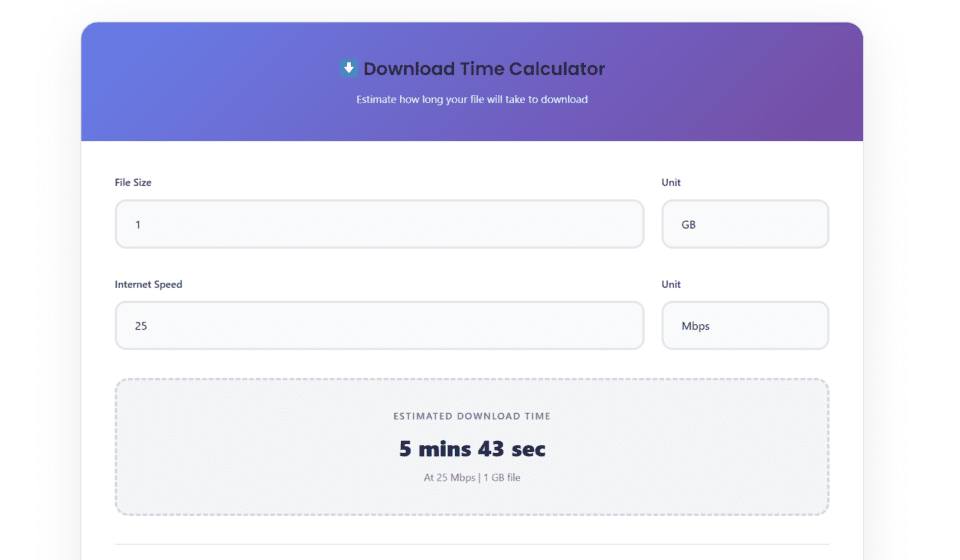
⬇️ Download Time Calculator
Estimate how long your file will take to download
📊 Compare with other speeds:
Why You Should Use One Before Every Big Download
- Plan your schedule. A 90 GB game at 25 Mbps will take roughly eight hours. Knowing that upfront helps you start the download before bed, not before a gaming session.
- Verify your ISP promises. If the calculator says a 2 GB file should finish in 10 minutes at your rated speed, but it is taking 40, you have objective proof of a bottleneck.
- Avoid data cap surprises. Mobile and satellite users can see exactly how much of their monthly allowance a single download will consume.
- Pick the right server mirror. Downloading from a slower mirror? The calculator helps you compare estimated times across sources.
How to Use It (Three Simple Steps)
Step 1: Enter your file size. Select the unit — MB, GB, TB, or even KB.
Step 2: Enter your internet speed. Choose Mbps, MB/s, Gbps, or Kbps. If you are unsure of your speed, run a quick test first.
Step 3: Read your result. The calculator converts everything into hours, minutes, and seconds instantly.
Pro tip: For the most accurate estimate, use your actual sustained speed, not the peak number your ISP advertises. Real-world speeds often run 10–20% lower due to network overhead.
What Actually Affects Your Real Download Time?
A download speed calculator gives you a theoretical baseline. In practice, these variables shift the number:
- Network congestion. Peak evening hours can throttle shared neighborhood bandwidth.
- Server capacity. A crowded CDN or slow host server caps your speed regardless of your fiber line.
- Wi-Fi vs. Ethernet. Wireless interference, walls, and distance silently eat speed. A wired connection often delivers the full rated throughput.
- Simultaneous usage. If someone else is streaming 4K video or uploading large files, your effective download speed drops.
- Protocol overhead. Encryption, packet loss, and retransmissions add a small time tax that pure math cannot predict.
Treat the calculator result as your best-case scenario. Add a 15% buffer for real-world conditions.
Also read- Affordable Digital Marketing Services for Small Businesses in India (2026 Guide)
Frequently Asked Questions
Is a download speed calculator accurate? Yes, mathematically. It converts file size and speed into time using precise unit conversions. Real-world accuracy depends on your actual sustained speed and network conditions.
Why is my real download slower than the calculator says? ISPs advertise maximum speeds. Sustained speeds vary. Plus, server-side limits, Wi-Fi interference, and household traffic all reduce the real number.
Does the calculator work for upload speeds too? Most calculators are built for downloads. However, the same math applies to uploads. Just enter your upload speed instead of download speed.
What is the difference between MB and Mb? MB (megabytes) measures file size. Mb (megabits) measures data transfer speed. There are 8 megabits in 1 megabyte. The calculator handles this conversion automatically.
Try the Calculator Now
Stop staring at frozen progress bars. Use our download speed calculator above to plan your next download with confidence. Whether you are grabbing a work presentation or the latest AAA title, knowing your wait time puts you back in control.